Latest Products
-1740404792-0.jpeg)


- Brand: Apple
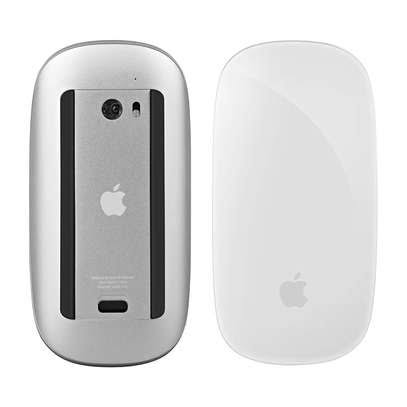
- Product Name: Apple Magic Mouse 3 (USB-C)
- Official Product Name: Apple Magic Mouse (USB-C)
- Product Type: Wireless Rechargeable Multi-Touch Mouse
- Connectivity: Bluetooth Wireless Technology
- Touch Surface: Multi-Touch Gesture Support
- Controls: Click, Scroll, Swipe and Gesture Navigation
- Scrolling: Multi-Touch Surface for Vertical and Horizontal Scrolling
- Tracking: Optical Tracking Sensor
- Battery: Built-in Rechargeable Battery
- Battery Life: Approximately One Month or More Between Charges
- Charging Port: USB-C
- Charging Cable: USB-C Charge Cable Included in Standard Retail Packaging
- Compatibility: Mac with macOS 15.1 or Later; iPad with iPadOS 18.1 or Later
- Design: Low-Profile, Lightweight and Minimalist
- Dimensions: 113.5 × 57.1 × 21.6mm
- Weight: Approximately 99g
- Colour Options: White Multi-Touch Surface or Black Multi-Touch Surface
- Best For: MacBook, iMac, Mac mini, Mac Studio, Mac Pro, Office Work, Creative Productivity and Everyday Computing
- Features: USB-C Charging, Bluetooth Connectivity, Multi-Touch Gestures, Optical Tracking, Rechargeable Battery and Automatic Mac Pairing
Save KSh. 1,001
NB: Dear Valued Customer, due to the KRA introducing additional custom measures affecting clearance of mobile phones and other
electronic devices arriving in Kenya, we regret to inform you that we will be increasing prices.
Please kindly note that prices are subject to change without prior notice. Thank you.
For our corporate customers you can place your order seamlessly at corporates@linkphonescenter.com
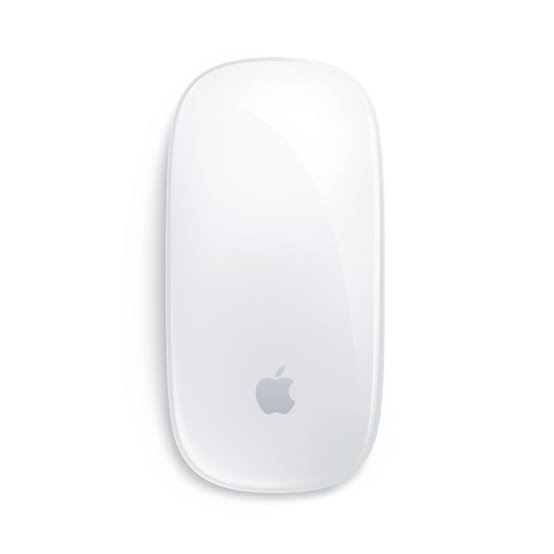
The Apple Magic Mouse 3 (USB-C) is a premium wireless rechargeable mouse designed to deliver precise navigation, smooth Multi-Touch gestures and convenient everyday productivity on compatible Mac and iPad devices. Officially known as the Apple Magic Mouse (USB-C), this modern Apple mouse combines Bluetooth wireless connectivity, an intuitive Multi-Touch surface, optical tracking and a built-in rechargeable battery in a slim, minimalist design.
Featuring a modern USB-C charging port, the Apple Magic Mouse provides convenient charging using a compatible USB-C cable and power source. Its Multi-Touch surface supports intuitive gestures such as scrolling through documents, swiping between supported pages and navigating content. Whether you are working on a MacBook Air, MacBook Pro, iMac, Mac mini or another compatible Apple device, the Magic Mouse offers a refined wireless navigation experience for professional and everyday computing.
Apple Magic Mouse 3 USB-C Price in Kenya, Specifications & Features
The Apple Magic Mouse 3 USB-C combines Apple's signature minimalist mouse design with modern USB-C charging and intuitive Multi-Touch controls. Designed for users who value a clean desktop setup, the mouse connects wirelessly through Bluetooth and provides smooth cursor movement through its optical tracking system.
With a rechargeable battery capable of lasting approximately one month or more between charges under typical usage conditions, a Multi-Touch gesture surface and a lightweight design, the Apple Magic Mouse is suitable for office work, web browsing, document editing, creative applications and everyday Mac productivity.
Premium Apple Wireless Mouse with USB-C Charging, Multi-Touch Gestures and Optical Tracking
The Apple Magic Mouse USB-C combines convenient wireless operation with a distinctive touch-sensitive surface designed for intuitive navigation.
Its Multi-Touch surface allows users to scroll through documents and web pages, swipe between supported content and perform gestures without a traditional scroll wheel.
The optical tracking sensor provides accurate cursor movement for everyday desktop tasks, while Bluetooth connectivity eliminates the need for a permanent cable connection.
The updated USB-C charging port makes it convenient to recharge the mouse using compatible modern charging accessories.
Apple Magic Mouse 3 USB-C Price in Kenya
The Apple Magic Mouse 3 (USB-C) price in Kenya ranges from KES 15,999 to KES 17,999 at Linkphones Center.
This premium Apple wireless mouse features USB-C charging, Bluetooth connectivity, Multi-Touch gesture controls, optical tracking and a built-in rechargeable battery, making it a practical accessory for compatible Mac and iPad users.
Where to Buy Apple Magic Mouse 3 USB-C in Kenya
Buy the Apple Magic Mouse 3 (USB-C) from Linkphones Center, your trusted electronics and accessories retailer in Nairobi, Kenya.
Whether you need a wireless mouse for your MacBook Air, MacBook Pro, iMac, Mac mini, Mac Studio or compatible iPad, the Apple Magic Mouse provides intuitive gesture navigation, convenient USB-C charging and a clean wireless desktop experience.
Visit Linkphones Center in Nairobi CBD or order remotely for delivery across Kenya.
Visit Our Store
- Shop Name: Linkphones Center
- Location: HH Towers, Moi Avenue, 5th Floor, Shop 504, Nairobi CBD
- Call / WhatsApp: 0729 222 000
- Delivery: Nationwide delivery across Kenya, including Nairobi, Mombasa, Kisumu, Nakuru, Eldoret, Thika, Nyeri, Machakos, Meru and other towns.
Linkphones Center provides convenient shopping at our Nairobi CBD store, with nationwide delivery available to customers across Kenya.
Specifications & Features
Modern USB-C Charging Port
The Apple Magic Mouse 3 USB-C features a modern USB-C charging port for recharging its built-in battery.
This updated charging connection replaces the Lightning port found on earlier Magic Mouse generations.
The USB-C port is located on the underside of the mouse, meaning the mouse cannot be used normally while connected to its charging cable.
Bluetooth Wireless Connectivity
The Apple Magic Mouse connects wirelessly to compatible Mac and iPad devices using Bluetooth technology.
Wireless connectivity eliminates the need for a permanent mouse cable during everyday operation.
This allows users to maintain a cleaner desk arrangement while positioning the mouse comfortably alongside their keyboard.
Multi-Touch Gesture Surface
One of the most distinctive features of the Apple Magic Mouse is its Multi-Touch surface.
Unlike traditional computer mice that rely on a physical scroll wheel, the Magic Mouse allows users to perform supported gestures directly on its touch-sensitive upper surface.
This provides a convenient way to scroll, swipe and navigate compatible applications.
Smooth Vertical Scrolling
The Multi-Touch surface supports vertical scrolling through documents, websites and supported applications.
Users can move a finger along the mouse surface to scroll through content without using a traditional mechanical scroll wheel.
This is particularly useful for reading articles, browsing websites and reviewing lengthy documents.
Horizontal Scrolling
The Apple Magic Mouse supports horizontal scrolling in compatible applications.
This is useful when navigating wide spreadsheets, timelines and other content extending beyond the visible screen.
Gesture behaviour depends on the application and configured mouse settings.
Swipe Between Supported Pages
The Magic Mouse supports gestures for moving between pages in compatible applications.
Users can swipe across the touch-sensitive surface to navigate supported browser pages and other content.
This helps provide a more fluid navigation experience when browsing and working with multiple pages.
Mission Control Gesture Support
On compatible Mac computers, the Magic Mouse supports configurable gestures for accessing Mission Control.
Mission Control helps users view open windows and organise their desktop workspace.
The available gesture and its behaviour depend on the macOS version and mouse settings.
Responsive Optical Tracking
The Apple Magic Mouse uses an optical tracking sensor to detect movement across suitable surfaces.
This provides precise cursor control for everyday tasks such as document editing, web browsing and application navigation.
Tracking performance can vary depending on the surface material and operating conditions.
Optimised Foot Design
The Magic Mouse features an optimised foot design intended to help it glide smoothly across suitable desk surfaces.
This supports convenient movement during everyday computing.
For best results, users should operate the mouse on a clean, appropriate surface.
Built-In Rechargeable Battery
The Apple Magic Mouse includes a built-in rechargeable battery.
Apple specifies approximately one month or more of use between charges under typical operating conditions.
Actual battery life varies depending on usage patterns, battery condition and operating conditions.
Convenient USB-C Charging Cable
The standard Apple Magic Mouse USB-C retail package includes a USB-C charge cable.
The cable can be connected to a compatible Mac or suitable USB-C power source to recharge the mouse.
A separate wall power adapter is not included in the standard package.
Automatic Pairing with Compatible Macs
The Apple Magic Mouse supports convenient pairing with compatible Mac computers.
Connecting the mouse to a compatible Mac using the supplied USB-C cable can establish the initial connection.
Once paired and disconnected from the cable, the mouse operates wirelessly through Bluetooth.
Low-Profile Minimalist Design
The Apple Magic Mouse features a slim, low-profile design that complements Apple desktop and laptop computers.
Its smooth upper surface integrates touch controls into a clean, minimalist appearance.
The compact construction is suitable for professional desks, home offices and everyday workspaces.
Lightweight and Portable
The Apple Magic Mouse weighs approximately 99g.
Its lightweight construction makes it convenient to move around a desk or carry in a laptop bag.
This makes it suitable for users who regularly work from different locations.
Compact Dimensions
The Magic Mouse measures approximately 113.5mm long, 57.1mm wide and 21.6mm high.
Its compact dimensions make it suitable for smaller workspaces and portable Mac setups.
The low-profile design provides a distinctive alternative to conventional computer mice.
Compatible with MacBook Air
The Apple Magic Mouse USB-C works with compatible MacBook Air computers running supported macOS versions.
It provides a convenient external mouse option for users who prefer mouse navigation over a built-in trackpad.
The wireless design is useful for desk setups and external monitor arrangements.
Compatible with MacBook Pro
The Magic Mouse supports compatible MacBook Pro computers.
Its Multi-Touch surface provides convenient navigation for supported applications.
The compact design makes it practical for professional workstations and mobile computing setups.
Compatible with iMac
The Apple Magic Mouse USB-C is designed to complement compatible iMac computers.
Its minimalist appearance matches the clean design of Apple's desktop systems.
Bluetooth connectivity helps maintain an uncluttered workspace.
Compatible with Mac mini
The Magic Mouse can be used with compatible Mac mini computers.
Its wireless connection provides convenient cursor control without requiring a permanent cable.
The Multi-Touch surface supports everyday navigation through macOS and compatible applications.
Compatible with Mac Studio and Mac Pro
The Apple Magic Mouse USB-C supports compatible Mac Studio and Mac Pro computers running supported macOS versions.
It provides wireless pointer control and supported Multi-Touch gestures for professional desktop environments.
Users can pair it with a compatible keyboard for a complete desktop input setup.
Compatible with Supported iPads
The Apple Magic Mouse USB-C supports compatible iPads running iPadOS 18.1 or later.
It can provide mouse pointer control for supported iPadOS interactions.
Some gestures and functions may differ from those available on macOS.
macOS Compatibility Requirements
Apple specifies a Mac with macOS 15.1 or later for the USB-C Magic Mouse.
Users should confirm that their Mac meets the operating system requirements before purchasing.
Older macOS versions may not provide full compatibility with the USB-C model.
iPadOS Compatibility Requirements
The Apple Magic Mouse USB-C supports compatible iPads running iPadOS 18.1 or later.
Mouse functionality depends on the iPad model, operating system and supported features.
Users should update their iPad to a compatible version where supported.
Customisable Mouse Settings
Compatible Mac computers allow users to adjust supported Magic Mouse settings.
These can include tracking speed, scrolling behaviour and supported gesture options.
This allows users to configure the mouse according to their navigation preferences.
Convenient Everyday Web Browsing
The Apple Magic Mouse is useful for browsing websites, navigating tabs and scrolling through online content.
Its Multi-Touch surface supports convenient gesture-based navigation in compatible browsers.
This provides an intuitive alternative to traditional mouse scrolling controls.
Suitable for Office Productivity
The Magic Mouse is suitable for everyday office applications, including document editing, email communication and spreadsheet navigation.
Its optical tracking sensor provides convenient cursor control, while Multi-Touch gestures simplify supported navigation tasks.
This makes it a practical accessory for business professionals, students and home office users.
Useful for Creative Applications
The Apple Magic Mouse can be used with compatible creative applications for cursor movement, object selection and navigation.
Its Multi-Touch gestures can assist with scrolling and moving through supported content.
Users who require specialised precision controls or additional programmable buttons may prefer a dedicated professional mouse for particular workflows.
Convenient for Travel and Mobile Work
The Magic Mouse's compact design makes it convenient for travel.
It can be packed alongside a MacBook and other accessories without occupying much space.
Its rechargeable battery reduces the need to carry disposable replacement batteries.
Everyday Applications and Uses
The Apple Magic Mouse 3 USB-C is suitable for:
- MacBook Air and MacBook Pro navigation
- iMac and Mac mini desktop setups
- Mac Studio and Mac Pro workstations
- Web browsing and online research
- Microsoft Word and Apple Pages
- Microsoft Excel and Apple Numbers
- Email and business communication
- Document editing and office administration
- Supported creative applications
- Multi-Touch gesture navigation
- Home office productivity
- Travel and mobile computing
- Compatible iPad pointer control
Why Choose Apple Magic Mouse 3 USB-C
- Apple Magic Mouse Design: Built to complement compatible Mac and iPad devices.
- USB-C Charging: Uses a modern USB-C charging connection.
- Bluetooth Connectivity: Provides convenient wireless operation.
- Multi-Touch Surface: Supports intuitive touch gestures.
- Vertical Scrolling: Enables convenient movement through documents and websites.
- Horizontal Scrolling: Useful for spreadsheets and wide content.
- Swipe Gestures: Supports navigation between compatible pages.
- Mission Control Support: Provides configurable macOS gesture functionality.
- Optical Tracking: Delivers accurate everyday cursor movement.
- Rechargeable Battery: Eliminates the need for disposable batteries.
- Long Battery Life: Approximately one month or more between charges.
- Automatic Mac Pairing: Supports convenient setup with compatible Mac computers.
- Low-Profile Design: Provides a clean and minimalist appearance.
- Lightweight Construction: Convenient for everyday use and travel.
- Mac Compatibility: Works with supported Mac computers.
- iPad Compatibility: Supports compatible iPads running supported iPadOS versions.
- USB-C Cable Included: Standard retail packaging includes a charging cable.
- Professional Productivity: Suitable for office work, web browsing and everyday computing.
Technical Specifications
- Brand: Apple
- Product Name: Apple Magic Mouse (USB-C)
- Common Product Name: Apple Magic Mouse 3 USB-C
- Product Type: Wireless Rechargeable Multi-Touch Mouse
- Connectivity: Bluetooth
- Connection Type: Wireless
- Tracking Technology: Optical Sensor
- Touch Surface: Multi-Touch
- Gesture Support: Scrolling, Swiping and Supported macOS Gestures
- Vertical Scrolling: Supported
- Horizontal Scrolling: Supported
- Physical Scroll Wheel: Not Included
- Battery: Built-in Rechargeable Battery
- Battery Life: Approximately One Month or More Between Charges
- Charging Port: USB-C
- Charging Cable: USB-C Charge Cable Included
- Charging Port Location: Underside of Mouse
- Use While Charging: Not Supported
- Automatic Pairing: Supported with Compatible Mac Computers
- Mac System Requirement: macOS 15.1 or Later
- iPad System Requirement: iPadOS 18.1 or Later
- MacBook Air Compatibility: Supported Models
- MacBook Pro Compatibility: Supported Models
- iMac Compatibility: Supported Models
- Mac mini Compatibility: Supported Models
- Mac Studio Compatibility: Supported Models
- Mac Pro Compatibility: Supported Models
- iPad Compatibility: Supported iPadOS Models
- Length: 113.5mm
- Width: 57.1mm
- Height: 21.6mm
- Weight: Approximately 99g
- Colour Options: White Multi-Touch Surface and Black Multi-Touch Surface
- Design: Slim, Low-Profile Construction
- Primary Applications: Mac Navigation, Office Productivity, Web Browsing, Document Editing and Everyday Computing
What's in the Box
- Apple Magic Mouse (USB-C) ×1
- USB-C Charge Cable ×1
- Product Documentation
Note: Mac computers, iPads, keyboards and other accessories are sold separately. The Magic Mouse USB-C charging port is located on the underside of the mouse, so normal mouse operation is not possible while the charging cable is connected.
FAQ
1. What is the Apple Magic Mouse 3 USB-C price in Kenya?
The Apple Magic Mouse 3 (USB-C) price in Kenya ranges from KES 15,999 to KES 17,999 at Linkphones Center.
2. Where can I buy Apple Magic Mouse 3 USB-C in Kenya?
You can buy Apple Magic Mouse 3 USB-C from Linkphones Center at HH Towers, Moi Avenue, 5th Floor, Shop 504, Nairobi CBD. Call or WhatsApp 0729 222 000. Nationwide delivery is available across Kenya.
3. What is Apple Magic Mouse 3 USB-C?
It is Apple's rechargeable wireless Multi-Touch mouse featuring Bluetooth connectivity, optical tracking and USB-C charging.
4. Is Apple Magic Mouse 3 the same as Magic Mouse USB-C?
The name Apple Magic Mouse 3 is commonly used for the newer USB-C model, while Apple's official product name is Magic Mouse (USB-C).
5. Does Apple Magic Mouse 3 use USB-C charging?
Yes. The newer Magic Mouse features a USB-C charging port.
6. Is Apple Magic Mouse 3 wireless?
Yes. It connects wirelessly through Bluetooth.
7. Does Apple Magic Mouse 3 support Multi-Touch gestures?
Yes. It supports scrolling, swiping and other compatible Multi-Touch gestures.
8. Does Apple Magic Mouse 3 have a scroll wheel?
No. It uses a Multi-Touch surface for scrolling instead of a traditional physical scroll wheel.
9. Can Apple Magic Mouse 3 scroll horizontally?
Yes. It supports horizontal scrolling in compatible applications.
10. Does Apple Magic Mouse 3 work with MacBook Air?
Yes. It supports compatible MacBook Air computers running macOS 15.1 or later.
11. Does Apple Magic Mouse 3 work with MacBook Pro?
Yes. It supports compatible MacBook Pro computers running supported macOS versions.
12. Does Apple Magic Mouse 3 work with iMac?
Yes. It supports compatible iMac computers running macOS 15.1 or later.
13. Does Apple Magic Mouse 3 work with Mac mini?
Yes. It supports compatible Mac mini computers.
14. Does Apple Magic Mouse 3 work with Mac Studio?
Yes. It supports compatible Mac Studio computers running supported macOS versions.
15. Does Apple Magic Mouse 3 work with iPad?
Yes. It supports compatible iPads running iPadOS 18.1 or later.
16. How long does Apple Magic Mouse 3 battery last?
Apple specifies approximately one month or more between charges under typical usage conditions.
17. Can I use Apple Magic Mouse 3 while charging?
No. The USB-C charging port is located underneath the mouse, preventing normal use while charging.
18. Does Apple Magic Mouse 3 include a charging cable?
Yes. The standard Apple retail package includes a USB-C charge cable.
19. Does Apple Magic Mouse 3 require disposable batteries?
No. It has a built-in rechargeable battery.
20. Does Apple Magic Mouse 3 support automatic pairing?
Yes. It supports convenient pairing with compatible Mac computers.
21. Is Apple Magic Mouse 3 suitable for office work?
Yes. It is useful for document editing, web browsing, email communication and everyday office productivity.
22. How much does Apple Magic Mouse 3 weigh?
The Apple Magic Mouse USB-C weighs approximately 99g.
23. What is the difference between Magic Mouse Lightning and Magic Mouse USB-C?
The main difference is the charging connector. Older Magic Mouse models use Lightning, while the newer model uses USB-C. Both feature wireless connectivity and Multi-Touch navigation.
24. What comes in the Apple Magic Mouse 3 USB-C box?
The standard package includes the Apple Magic Mouse USB-C, a USB-C charge cable and product documentation.
25. Does Linkphones Center deliver Apple Magic Mouse 3 USB-C outside Nairobi?
Yes. Linkphones Center offers nationwide delivery across Kenya, including Mombasa, Kisumu, Nakuru, Eldoret, Thika, Nyeri, Machakos, Meru and other towns. Call or WhatsApp 0729 222 000 to place your order.