Latest Products



- Brand: Microsoft
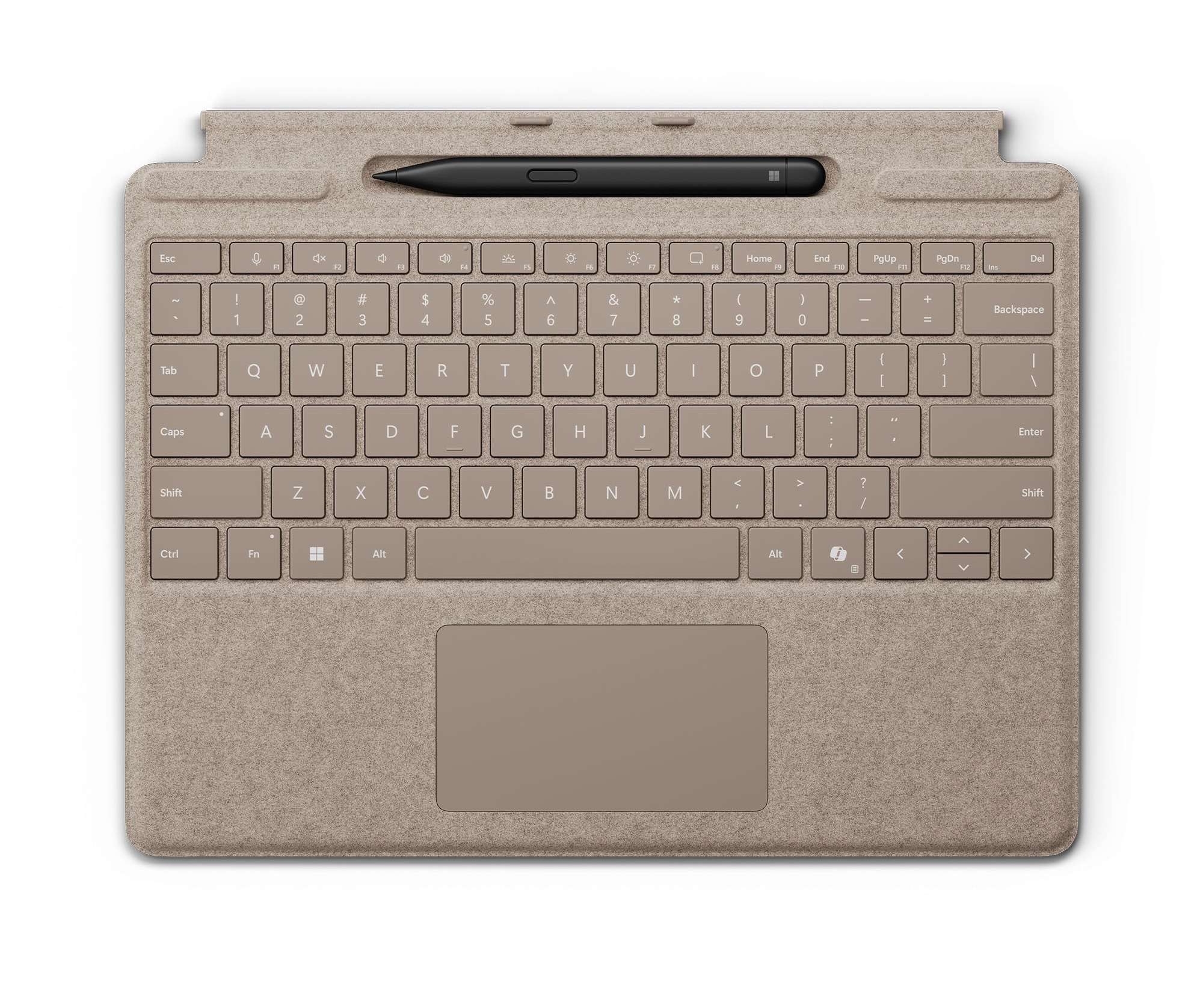
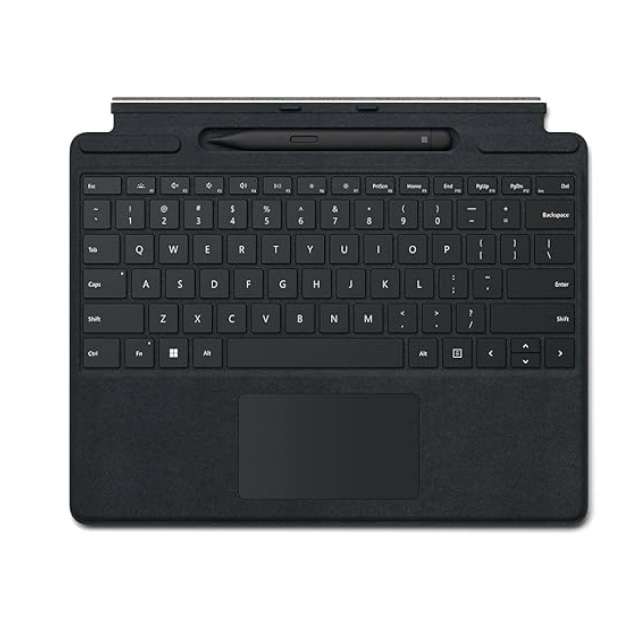
- Product: Surface Pro 13″ Keyboard with Slim Pen
- Keyboard: Backlit QWERTY Mechanical Keyboard
- Included Accessory: Microsoft Surface Slim Pen
- Pen Sensitivity: 4,096 Pressure Levels
- Pen Storage: Built-In Storage and Charging Tray
- Touchpad: Large Precision Glass Touchpad
- Special Keys: Copilot, Microphone Mute and Snipping Tool
- Connection: Magnetic Surface Connector
- Material: Premium Alcantara
- Compatibility: Surface Pro 13″, Surface Pro 11th Edition, Surface Pro 9 and Surface Pro 8
Save KSh. 6,000
NB: Dear Valued Customer, due to the KRA introducing additional custom measures affecting clearance of mobile phones and other
electronic devices arriving in Kenya, we regret to inform you that we will be increasing prices.
Please kindly note that prices are subject to change without prior notice. Thank you.
For our corporate customers you can place your order seamlessly at corporates@linkphonescenter.com
Warranty Terms: 6 Months Warranty (SHOP warranty ONLY)
Microsoft Surface Pro 13-inch Keyboard with Slim Pen – Price in Kenya, Specifications & Features
The Microsoft Surface Pro 13-inch Keyboard with Slim Pen is a premium productivity bundle designed to transform a compatible Surface Pro tablet into a laptop-style workstation. It combines a backlit mechanical keyboard, precision glass touchpad and Microsoft Surface Slim Pen in one compact accessory.
The integrated pen tray stores and recharges the Slim Pen, keeping it ready for handwritten notes, drawing, document annotation and creative work. Dedicated Copilot, microphone-mute and screen-snipping keys provide faster access to useful Windows tools.
Where to Buy Microsoft Surface Pro 13-inch Keyboard with Slim Pen in Kenya
Buy the Microsoft Surface Pro 13-inch Keyboard with Slim Pen from Linkphones Center in Nairobi CBD or order for delivery anywhere in Kenya.
- Shop: Linkphones Center
- Location: HH Towers, Moi Avenue, 5th Floor, Shop 504, Nairobi CBD
- Call or WhatsApp: 0729 222 000
- Delivery: Available nationwide across Kenya
Microsoft Surface Pro 13-inch Keyboard with Slim Pen Price in Kenya
The price in Kenya for the Microsoft Surface Pro 13-inch Keyboard with Slim Pen ranges from KES 33,999 to KES 39,999, depending on availability.
Specifications & Features
Keyboard and Slim Pen Bundle
The package combines two essential Surface Pro accessories:
- Microsoft Surface Pro 13-inch Keyboard
- Microsoft Surface Slim Pen
The keyboard provides a comfortable laptop-style typing experience, while the Slim Pen supports handwriting, sketching and precise on-screen control.
This package does not include a Microsoft Surface Pro tablet.
Premium Backlit Keyboard
The Surface Pro Keyboard features a full QWERTY layout with mechanical moving keys. Its optimised key spacing and travel provide a familiar typing experience for documents, emails, spreadsheets and other productivity tasks.
Adjustable keyboard backlighting makes the keys easier to see when working in dim rooms, during travel or at night.
Keyboard features include:
- Full QWERTY layout
- Backlit mechanical keys
- Full row of function keys
- Windows shortcut keys
- Media controls
- Screen-brightness controls
- Multiple typing positions
- Slim and lightweight construction
Dedicated Copilot Key
A dedicated Copilot key provides quick access to Microsoft’s AI features on supported Windows devices.
Pressing the key can open Copilot for assistance with writing, summarising, planning and other supported tasks. When Copilot is unavailable or disabled, the key may open Windows Search instead.
Copilot availability and functionality depend on the connected Surface Pro, Windows version, region and Microsoft account.
Microphone-Mute Shortcut
A dedicated microphone key allows users to mute or unmute the microphone quickly during supported video calls and online meetings.
This is useful when using platforms such as Microsoft Teams and other compatible communication applications.
Snipping Tool Shortcut
The dedicated screen-snipping key opens the Windows Snipping Tool for faster screenshots.
Users can capture the whole screen, a selected window or a specific area without navigating through several menus.
Large Precision Glass Touchpad
The keyboard includes a large precision glass touchpad for smooth cursor movement and accurate navigation.
It supports Windows multi-touch gestures for scrolling, switching applications and managing open windows. The mechanical touchpad provides familiar physical feedback when clicked.
Touchpad features include:
- Precision glass surface
- Multi-touch gesture support
- Accurate cursor movement
- Left- and right-click functions
- Approximately 100.7 × 56.7mm touch area
This is a mechanical touchpad rather than the larger haptic touchpad found on the Surface Pro Flex Keyboard.
Included Surface Slim Pen
The included Surface Slim Pen is designed for natural handwriting, sketching, shading and document annotation.
Its slim profile resembles a traditional carpenter’s pencil, making it comfortable to hold while remaining easy to store inside the keyboard’s integrated tray.
Slim Pen features include:
- 4,096 pressure-sensitivity levels
- Zero-force inking
- Precise pen input
- Tilt and shading support
- Side button
- Top button with eraser functionality
- Rechargeable lithium-ion battery
- Haptic feedback on compatible Surface devices
Pen features may vary according to the connected Surface Pro model and Windows version.
Integrated Pen Storage and Charging
A recessed tray above the keyboard stores the Surface Slim Pen securely.
The pen charges while placed inside the tray, eliminating the need for a separate charging cable. Magnetic alignment keeps it in position when the keyboard is closed or carried inside a bag.
The storage tray also helps prevent the pen from being misplaced during travel.
Magnetic Surface Connection
The keyboard attaches magnetically to a compatible Surface Pro through the Surface connector.
Once connected, it is recognised automatically without manual Bluetooth pairing. The magnetic attachment also allows the keyboard to be positioned at a comfortable typing angle.
Connection features include:
- Magnetic attachment
- Surface connector
- Automatic detection
- No separate keyboard charging required
- No manual Bluetooth setup
Important Attached-Use Information
This is the standard Surface Pro Keyboard with Slim Pen. It must remain connected to the Surface Pro to work.
It does not support detached wireless typing. Buyers who require a keyboard that works while physically separated from the tablet should consider the Microsoft Surface Pro 13-inch Flex Keyboard.
Premium Alcantara Material
The keyboard is covered in Microsoft’s premium Alcantara material, which provides a soft and comfortable palm-rest surface.
Alcantara gives the keyboard a premium appearance while keeping the accessory slim and lightweight. It should be cleaned carefully according to Microsoft’s care instructions to prevent staining or material damage.
Screen Protection
When closed, the keyboard covers the Surface Pro display and helps protect it against scratches during storage and transportation.
It functions as a screen cover but does not replace a dedicated protective case for impact protection.
Surface Pro Compatibility
The Microsoft Surface Pro 13-inch Keyboard with Slim Pen is designed for compatible 13-inch Surface Pro models using Microsoft’s magnetic keyboard connector.
Supported models include:
- Microsoft Surface Pro 13-inch
- Microsoft Surface Pro 11th Edition
- Microsoft Surface Pro 10 for Business with a compatible keyboard configuration
- Microsoft Surface Pro 9
- Microsoft Surface Pro 8
Compatibility can vary by consumer or business keyboard version. Buyers should confirm their Surface Pro model before purchasing.
The keyboard is not designed for:
- Surface Pro 12-inch
- Surface Pro 7 or earlier models
- Surface Go
- Surface Laptop devices
Productivity and Creative Uses
The keyboard and pen bundle is suitable for:
- Typing documents
- Writing emails
- Online classes
- Business meetings
- Handwritten notes
- Digital signatures
- Drawing and sketching
- Annotating documents
- Editing presentations
- Navigating Windows applications
Students can use the Slim Pen for handwritten notes, while professionals can mark documents, sign forms and create diagrams directly on the Surface Pro display.
Keyboard Dimensions and Weight
The keyboard measures approximately:
- Length: 289.1mm
- Width: 226.1mm
- Thickness: 4.89mm
- Weight: Approximately 294g
Its thin construction adds laptop functionality to a Surface Pro without significantly reducing portability.
Slim Pen Dimensions and Weight
The included Surface Slim Pen measures approximately:
- Length: 136.8mm
- Width: 11.3mm
- Thickness: 6.3mm
- Weight: Approximately 13g
Its lightweight design is suitable for extended writing and drawing sessions.
Microsoft Surface Pro Keyboard Colours
The Surface Pro 13-inch Keyboard with Slim Pen is available in selected markets in:
- Black
- Platinum
- Dune
- Sapphire or Bright Sapphire
Windows 11 Integration
The keyboard is designed to work closely with Windows 11 features, including:
- Copilot
- Windows Search
- Snipping Tool
- Touchpad gestures
- Microphone controls
- Windows keyboard shortcuts
- Surface application settings
Certain features may require the latest Windows and Surface firmware updates.
What Is in the Box?
The standard package contains:
- Microsoft Surface Pro 13-inch Keyboard
- Microsoft Surface Slim Pen
- Startup card
- Warranty and safety documentation
The Surface Pro tablet and other accessories are sold separately.
Why Choose the Microsoft Surface Pro 13-inch Keyboard with Slim Pen?
- Keyboard and Surface Slim Pen included
- Comfortable backlit mechanical keys
- Large precision glass touchpad
- Built-in pen storage
- Automatic Slim Pen charging
- Dedicated Copilot key
- Microphone-mute shortcut
- Snipping Tool shortcut
- 4,096 pressure-sensitivity levels
- Premium Alcantara material
- Magnetic Surface connection
- Slim and lightweight construction
- Converts a Surface Pro into a laptop-style workstation
- Suitable for typing, writing, drawing and document annotation
FAQ
1. What is the Microsoft Surface Pro 13-inch Keyboard with Slim Pen price in Kenya?
The price in Kenya for the Microsoft Surface Pro 13-inch Keyboard with Slim Pen ranges from KES 33,999 to KES 39,999, depending on availability.
2. Is the Surface Slim Pen included?
Yes. This package includes a Microsoft Surface Slim Pen together with the Surface Pro 13-inch Keyboard. The pen stores and recharges inside the keyboard tray.
3. Which Surface Pro models are compatible?
It is compatible with selected 13-inch Surface Pro models, including the Surface Pro 11th Edition, Surface Pro 9 and Surface Pro 8. Compatible business versions can also support the Surface Pro 10 for Business.
4. Can the keyboard work when detached from the Surface Pro?
No. The standard Surface Pro 13-inch Keyboard must remain connected through the magnetic Surface connector. For detached wireless use, choose the Surface Pro 13-inch Flex Keyboard.
5. Does the package include the Surface Pro tablet?
No. The package contains the keyboard and Surface Slim Pen only. The Microsoft Surface Pro tablet is purchased separately.

-1743760787-0.jpeg)