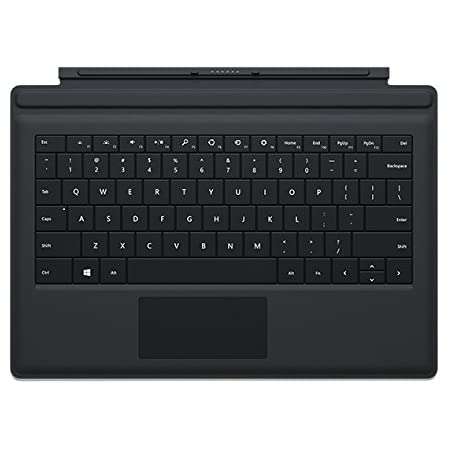
Latest Products


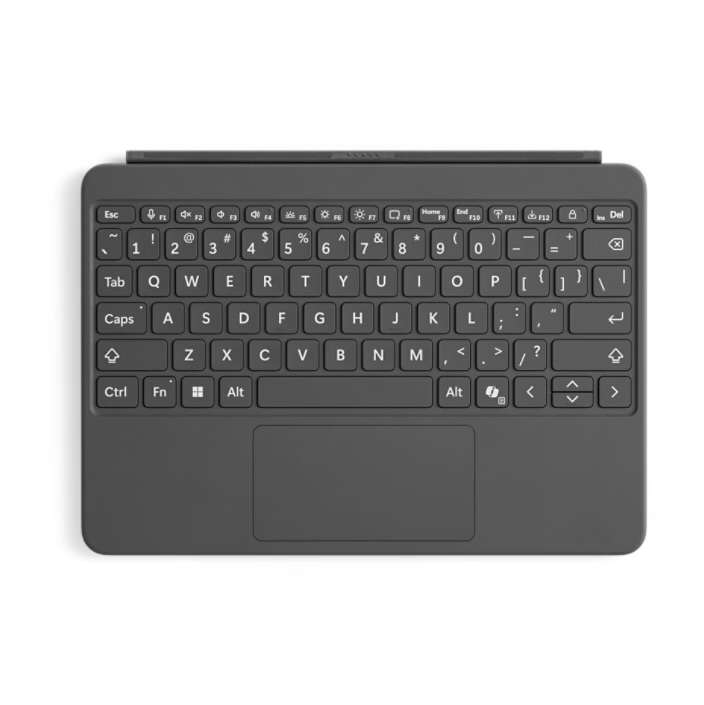
- Type: Detachable Keyboard and Digital Pen Bundle
- Brand: Microsoft
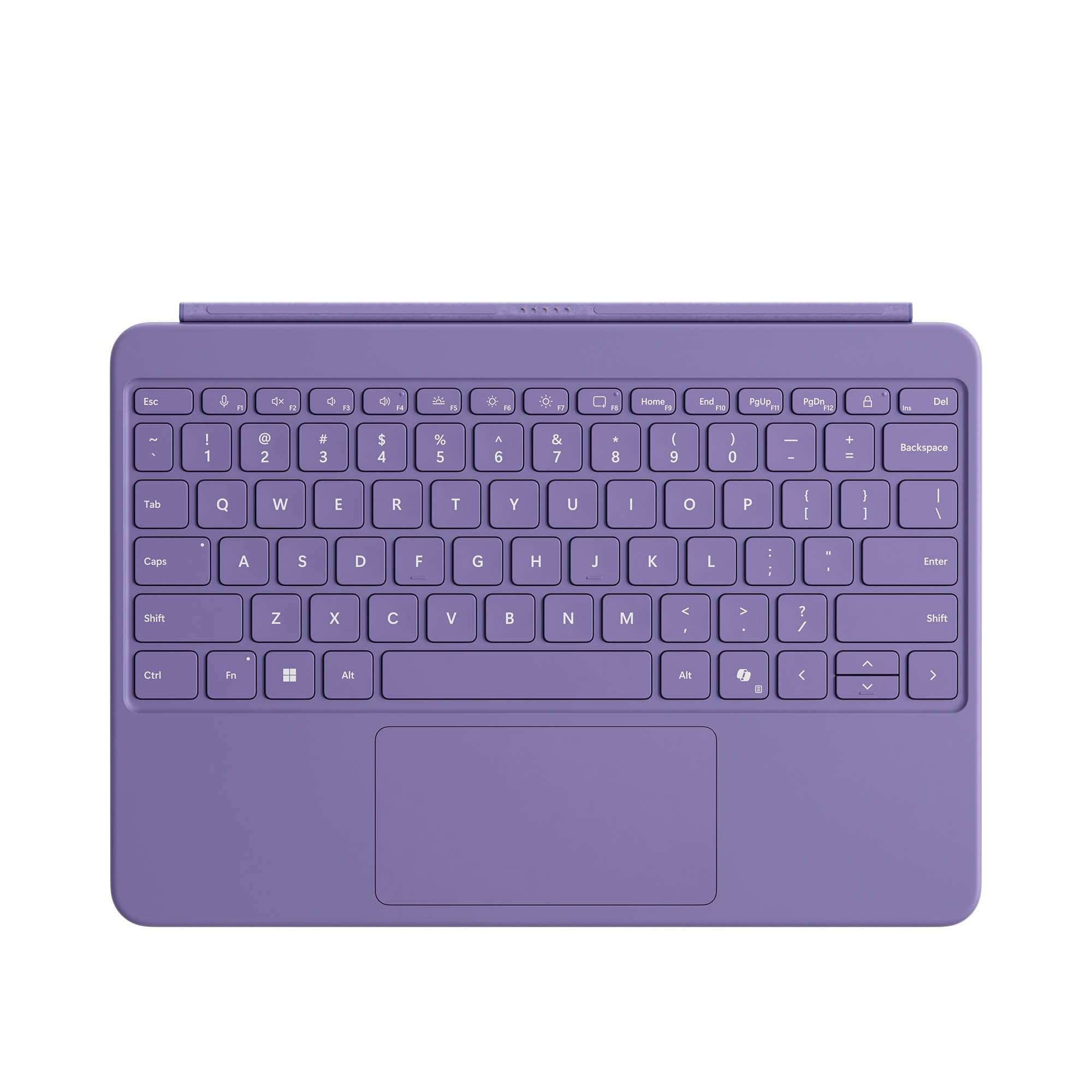
- Product Name: Microsoft Surface Pro 12-inch Keyboard with Slim Pen
- Compatibility: Microsoft Surface Pro 12-inch and Surface Pro for Business 12-inch
- Keyboard: Full-Size Backlit Keyboard
- Touchpad: Built-in Precision Touchpad
- Touchpad Features: Adaptive Touch Mode and Windows Gesture Support
- Keyboard Connection: Magnetic Attachment
- Hinge: Flexible 360° Dynamic Hinge
- Dedicated Keys: Copilot, Microphone Mute, Snipping, Lock and Function Keys
- Pen: Microsoft Surface Slim Pen Included
- Pen Technology: Pressure-Sensitive Digital Inking
- Pen Functions: Handwriting, Sketching, Drawing, Annotation and Note-Taking
- Pen Feedback: Haptic Feedback on Supported Devices and Applications
- Pen Charging: Magnetic Charging on Compatible Surface Pro 12-inch
- Keyboard Materials: Smooth-Matte Palm Rest and Alcantara Back Cover
- Keyboard Weight: Approximately 340g
- Design: Slim, Lightweight and Detachable
- Best For: Office Work, Studying, Digital Note-Taking, Creative Work, Drawing and Everyday Productivity
- Features: Backlit Keyboard, Precision Touchpad, Copilot Key, 360° Flexible Hinge, Magnetic Attachment, Surface Slim Pen and Digital Inking Support
Save KSh. 4,000
NB: Dear Valued Customer, due to the KRA introducing additional custom measures affecting clearance of mobile phones and other
electronic devices arriving in Kenya, we regret to inform you that we will be increasing prices.
Please kindly note that prices are subject to change without prior notice. Thank you.
For our corporate customers you can place your order seamlessly at corporates@linkphonescenter.com
Warranty Terms: 6 Months Warranty (SHOP warranty ONLY)
The Microsoft Surface Pro 12-inch Keyboard with Slim Pen is a premium productivity and creativity accessory bundle designed specifically for the Microsoft Surface Pro 12-inch Copilot+ PC. Combining a full-size backlit keyboard, precision touchpad and Microsoft Surface Slim Pen 2nd Edition, this bundle transforms your compatible Surface Pro into a versatile device for typing, digital handwriting, drawing, note-taking and everyday computing.
Featuring a 360° dynamic hinge, secure magnetic keyboard attachment, dedicated Copilot key and a rechargeable digital pen with 4,096 pressure sensitivity levels, the bundle offers flexibility for professionals, students, designers and content creators. The Surface Slim Pen attaches magnetically to the back of the compatible Surface Pro 12-inch for convenient storage and charging, while the keyboard provides comfortable typing and responsive navigation.
Microsoft Surface Pro 12-inch Keyboard with Slim Pen Price in Kenya, Specifications & Features
The Microsoft Surface Pro 12-inch Keyboard with Slim Pen brings together two essential Surface accessories in one convenient package. The detachable keyboard provides a laptop-style typing experience, while the included Surface Slim Pen allows users to write, sketch, annotate documents and interact with supported creative applications directly on the Surface Pro touchscreen.
Designed for the Surface Pro 12-inch, the keyboard features backlit mechanical keys, a precision touchpad with adaptive touch mode, an Alcantara-covered back and a smooth-matte palm rest. The included Surface Slim Pen 2nd Edition supports precise digital inking, natural shading, pressure-sensitive drawing and compatible haptic feedback, making the bundle suitable for both productivity and creative work.
Premium Surface Pro Keyboard and Slim Pen Bundle for Productivity and Creativity
The Microsoft Surface Pro 12-inch Keyboard with Slim Pen combines comfortable typing and precision digital inking in one versatile accessory package.
The full-size backlit keyboard provides a familiar typing experience for preparing documents, responding to emails, creating presentations and completing everyday assignments.
Its integrated precision touchpad supports accurate cursor movement, scrolling and Windows gestures, while the 360° flexible hinge allows convenient positioning during use.
The included Surface Slim Pen 2nd Edition provides 4,096 pressure sensitivity levels, haptic feedback in supported applications and a rechargeable battery, allowing users to take handwritten notes, draw and annotate digital documents.
Microsoft Surface Pro 12-inch Keyboard with Slim Pen Price in Kenya
The Microsoft Surface Pro 12-inch Keyboard with Slim Pen price in Kenya ranges from KES 35,499 to KES 39,499.
This accessory bundle combines a backlit Surface Pro keyboard, precision touchpad, 360° dynamic hinge, dedicated Copilot key and Surface Slim Pen 2nd Edition with pressure-sensitive digital inking and magnetic charging support.
Where to Buy Microsoft Surface Pro 12-inch Keyboard with Slim Pen in Kenya
Buy the Microsoft Surface Pro 12-inch Keyboard with Slim Pen from Linkphones Center, your trusted electronics and accessories retailer in Nairobi, Kenya.
Whether you use your Surface Pro for business productivity, university assignments, digital drawing, handwritten notes, presentations or creative projects, this keyboard and pen bundle provides a convenient way to expand your device's capabilities.
Visit Linkphones Center in Nairobi CBD or order remotely for delivery across Kenya.
Visit Our Store
- Shop Name: Linkphones Center
- Location: HH Towers, Moi Avenue, 5th Floor, Shop 504, Nairobi CBD
- Call / WhatsApp: 0729 222 000
- Delivery: Nationwide delivery across Kenya, including Nairobi, Mombasa, Kisumu, Nakuru, Eldoret, Thika, Nyeri, Machakos, Meru and other towns.
Whether you're shopping at our Nairobi CBD store or ordering remotely, Linkphones Center offers nationwide delivery across Kenya.
Specifications & Features
Designed for Microsoft Surface Pro 12-inch
The Microsoft Surface Pro 12-inch Keyboard with Slim Pen is designed for the Surface Pro 12-inch Copilot+ PC.
The keyboard attaches directly to the compatible tablet through its magnetic connection interface, providing an integrated typing and navigation experience.
The Surface Slim Pen 2nd Edition works with the compatible Surface Pro touchscreen, enabling handwriting, sketching and other supported pen interactions.
The keyboard is not compatible with the larger Surface Pro 13-inch models or older Surface Pro devices that use different keyboard connection systems.
Full-Size Backlit Keyboard
The Surface Pro 12-inch Keyboard features a full-size mechanical key layout designed for comfortable everyday typing.
Its built-in keyboard backlighting improves key visibility in dimly lit environments, making it useful for evening study sessions, office work and travel.
The keyboard provides a familiar typing experience for documents, emails, presentations and other productivity applications.
Precision Touchpad with Windows Gesture Support
The keyboard includes a spacious precision touchpad designed for accurate cursor navigation, clicking and scrolling.
Users can navigate Windows applications, move between documents and perform supported touchpad gestures without needing an external mouse.
The integrated touchpad makes the Surface Pro more convenient for laptop-style productivity.
Adaptive Touch Mode for Accessibility
The precision touchpad supports adaptive touch mode, an accessibility feature designed to accommodate different interaction methods.
It allows supported touchpad settings to be adjusted for users with different mobility and dexterity requirements.
This provides additional flexibility when using the keyboard for everyday computing.
360° Dynamic Hinge
The Surface Pro 12-inch Keyboard features a dynamic hinge that flexes through 360°.
This flexible hinge design helps users find comfortable positions for typing and other activities.
Its Alcantara-covered construction complements the keyboard's premium design while allowing flexible positioning.
Secure Magnetic Keyboard Attachment
The keyboard connects to the Surface Pro 12-inch using a magnetic attachment interface.
This allows users to connect or detach the keyboard without a separate Bluetooth pairing process.
When the keyboard is removed, the Surface Pro can be used independently as a touchscreen tablet.
Microsoft Surface Slim Pen 2nd Edition Included
The bundle includes the Microsoft Surface Slim Pen 2nd Edition, a rechargeable digital pen designed for precise writing and drawing on compatible Surface devices.
The pen features a slim, comfortable design and supports handwritten notes, digital sketches, document annotations and creative applications.
Its advanced inking capabilities make it useful for students, designers, business professionals and users who prefer handwriting over typing.
4,096 Pressure Sensitivity Levels
The Surface Slim Pen supports 4,096 pressure sensitivity levels, allowing supported applications to respond to different amounts of pressure applied during writing or drawing.
Light pressure can produce finer strokes, while increased pressure can create stronger or thicker marks depending on the application.
This provides greater control for digital illustration, sketching, handwriting and creative design work.
Zero-Force Inking
The Surface Slim Pen supports zero-force inking, helping the pen register supported input with very light contact.
This contributes to a responsive writing experience when taking notes, drawing and interacting with compatible applications.
The feature is useful for users who want a natural digital handwriting experience.
Natural Shading and Drawing Control
The Surface Slim Pen supports precise digital inking and shading in compatible creative applications.
Users can create sketches, illustrations, handwritten notes and annotated documents using the pen's pressure-sensitive input.
The combination of pressure sensitivity and supported shading functionality provides greater flexibility for creative work.
Haptic Feedback for a Natural Writing Experience
The Surface Slim Pen supports haptic feedback on compatible Surface devices and supported Windows applications.
Haptic feedback provides subtle tactile sensations during supported pen interactions, helping make digital writing feel more natural.
The availability and behaviour of haptic feedback depend on the device, operating system and application.
Magnetic Pen Storage and Charging
The Surface Slim Pen attaches magnetically to the back of the compatible Surface Pro 12-inch for storage and wireless charging.
This keeps the pen conveniently accessible while allowing its rechargeable battery to be replenished between uses.
The pen does not charge inside the keyboard. Magnetic pen storage and charging are provided by the compatible Surface Pro 12-inch tablet itself.
Rechargeable Surface Slim Pen Battery
The Surface Slim Pen 2nd Edition includes a rechargeable lithium-ion battery designed to support all-day use under typical conditions.
Its nominal battery capacity is 0.171Wh, with a specified minimum capacity of 0.164Wh.
The pen can be recharged through the compatible Surface Pro 12-inch's magnetic charging area.
Side Button and Top Button with Eraser Functionality
The Surface Slim Pen includes a side button and a top button with eraser functionality.
These controls support convenient interaction with compatible applications, including pen shortcuts and supported editing functions.
The eraser functionality is particularly useful when writing notes, drawing or annotating documents.
Dedicated Microsoft Copilot Key
The keyboard features a dedicated Microsoft Copilot key for quick access to supported Windows AI functionality.
On compatible devices and configurations, the key opens the available Copilot experience.
Feature availability varies by market, device settings and supported software.
Dedicated Microphone Mute Key
The Surface Pro 12-inch Keyboard includes a microphone mute key for convenient microphone control during supported online meetings and video calls.
This makes it easier to manage audio input when using Microsoft Teams and other compatible communication applications.
Dedicated Snipping and Lock Keys
The keyboard includes dedicated snipping and lock keys.
The snipping shortcut provides quick access to supported Windows screenshot functionality, while the lock key helps users secure their device when stepping away.
These shortcuts improve convenience during everyday productivity tasks.
Full Row of F1–F12 Function Keys
The Microsoft Surface Pro 12-inch Keyboard features a complete row of F1–F12 function keys.
These keys support familiar shortcuts and application functions commonly used in Windows productivity software.
The keyboard also includes supported Windows, media and screen-brightness controls.
Premium Alcantara Back Cover
The keyboard features an Alcantara back cover, providing a premium material finish and refined appearance.
Alcantara is a soft-touch synthetic material used in selected Microsoft Surface accessories.
The material complements the keyboard's flexible hinge and minimalist design.
Durable Smooth-Matte Palm Rest
The Surface Pro 12-inch Keyboard includes a smooth-matte palm rest designed for everyday use.
The finish provides a comfortable area for resting your hands while typing and is easy to wipe clean.
This makes the keyboard practical for office work, studying and frequent travel.
Slim and Lightweight Keyboard Design
The keyboard measures approximately 276 × 192 × 6.8mm and weighs 340g.
Its compact construction makes it convenient to carry alongside the compatible Surface Pro tablet.
The slim profile is particularly useful for students, business professionals and mobile workers who need a portable productivity setup.
Compact and Lightweight Surface Slim Pen
The Surface Slim Pen 2nd Edition measures approximately 136.8 × 11.3 × 6.3mm and weighs just 13g.
Its slim shape is designed to sit comfortably in the hand during writing, drawing and annotation.
The lightweight construction makes it convenient for extended note-taking and creative sessions.
Integrated Accelerometer Sensor
The Surface Pro 12-inch Keyboard includes an accelerometer sensor as part of its integrated hardware.
This sensor supports the keyboard's interaction with the compatible Surface Pro device.
Tablet-to-Laptop Productivity
The keyboard allows users to work with their Surface Pro 12-inch in a familiar laptop-style arrangement.
Its full-size typing layout and precision touchpad support document editing, presentations, email communication and web browsing.
When touchscreen interaction is preferred, the keyboard can be detached for tablet-only use.
Digital Note-Taking and Document Annotation
The included Surface Slim Pen makes it convenient to take handwritten notes, highlight information and annotate compatible digital documents.
Students can use the pen for lecture notes and study materials, while professionals can annotate reports, review documents and sketch ideas.
Supported inking features depend on the application being used.
Creative Drawing and Illustration
With 4,096 pressure levels, shading support and precise digital inking, the Surface Slim Pen is useful for drawing and creative applications.
Artists and designers can use the pen for sketches, illustrations, diagrams and other supported creative tasks.
The pen's lightweight construction and responsive input help provide a comfortable drawing experience.
Suitable for Work, Study and Creative Projects
The Microsoft Surface Pro 12-inch Keyboard with Slim Pen supports a wide range of productivity and creative activities, including:
- Office work and business productivity
- University and college assignments
- Handwritten digital notes
- Document writing and editing
- PDF annotation and document review
- Digital drawing and illustration
- Graphic design and creative sketching
- Microsoft Word, Excel and PowerPoint
- Online classes and virtual meetings
- Business presentations and reporting
- Remote working and mobile productivity
- Everyday Surface Pro computing
Why Choose Microsoft Surface Pro 12-inch Keyboard with Slim Pen
- Complete Keyboard and Pen Bundle: Includes both the Surface Pro 12-inch Keyboard and Surface Slim Pen 2nd Edition.
- Surface Pro 12-inch Compatibility: Designed specifically for the compatible Surface Pro 12-inch.
- Full-Size Backlit Keyboard: Provides comfortable typing and improved key visibility.
- Precision Touchpad: Supports accurate cursor navigation and Windows gestures.
- Adaptive Touch Mode: Provides additional accessibility options for touchpad interaction.
- 360° Dynamic Hinge: Supports flexible keyboard positioning.
- Magnetic Keyboard Attachment: Enables convenient connection and detachment.
- Surface Slim Pen Included: Adds handwriting, drawing and annotation functionality.
- 4,096 Pressure Levels: Supports precise pressure-sensitive digital inking.
- Zero-Force Inking: Provides responsive input with light pen contact.
- Natural Shading: Supports creative drawing and illustration in compatible applications.
- Haptic Feedback: Provides tactile sensations during supported pen interactions.
- Magnetic Pen Charging: Allows the pen to charge on the back of the compatible Surface Pro 12-inch.
- Rechargeable Pen Battery: Supports all-day use under typical conditions.
- Dedicated Copilot Key: Provides convenient access to supported Windows AI features.
- Microphone Mute Key: Simplifies microphone control during supported meetings.
- Snipping and Lock Keys: Provides quick access to useful Windows functions.
- F1–F12 Function Keys: Supports familiar keyboard shortcuts.
- Premium Alcantara Finish: Offers a refined keyboard design.
- Smooth-Matte Palm Rest: Provides a durable and comfortable typing surface.
- Lightweight Keyboard and Pen: Convenient for travel, study and mobile productivity.
- Versatile Productivity: Combines typing, touchpad navigation and digital handwriting.
Technical Specifications
- Brand: Microsoft
- Product Name: Surface Pro 12-inch Keyboard with Slim Pen
- Product Type: Detachable Keyboard and Digital Pen Bundle
- Compatibility: Microsoft Surface Pro 12-inch Copilot+ PC
- Keyboard Type: Detachable Surface Pro Keyboard
- Keyboard Layout: Full-Size QWERTY Keyboard
- Keyboard Mechanism: Moving Mechanical Keys
- Function Keys: F1–F12
- Keyboard Backlighting: Yes
- Touchpad: Precision Touchpad
- Touchpad Accessibility: Adaptive Touch Mode
- Keyboard Connection: Magnetic Attachment
- Keyboard Hinge: 360° Dynamic Hinge
- Dedicated AI Key: Microsoft Copilot Key
- Additional Keys: Microphone Mute, Snipping and Lock
- Windows Shortcuts: Supported
- Media Controls: Supported
- Screen Brightness Controls: Supported
- Keyboard Sensor: Accelerometer
- Palm Rest Material: Smooth-Matte Finish
- Back Cover Material: Alcantara
- Keyboard Dimensions: 276 × 192 × 6.8mm
- Keyboard Weight: Approximately 340g
- Keyboard Colours: Slate, Ocean and Violet
- Included Pen: Microsoft Surface Slim Pen 2nd Edition
- Pen Technology: Pressure-Sensitive Digital Inking
- Pen Pressure Sensitivity: 4,096 Levels
- Pen Inking: Zero-Force Inking
- Pen Shading: Supported in Compatible Applications
- Pen Haptic Feedback: Supported on Compatible Devices and Applications
- Pen Controls: Side Button and Top Button with Eraser Functionality
- Pen Battery Type: Rechargeable Lithium-Ion
- Pen Battery Life: All-Day Battery Life Under Typical Conditions
- Pen Battery Capacity: 0.171Wh Nominal
- Pen Minimum Battery Capacity: 0.164Wh
- Pen Charging: Magnetic Charging on Compatible Surface Pro 12-inch
- Pen Storage: Magnetic Attachment to Back of Compatible Surface Pro 12-inch
- Pen Dimensions: 136.8 × 11.3 × 6.3mm
- Pen Weight: Approximately 13g
- Pen Colour: Matte Black
- Warranty: 1-Year Microsoft Limited Hardware Warranty, Subject to Applicable Terms
- Application: Office Productivity, Digital Note-Taking, Drawing, Education and Creative Work
What's in the Box
- Microsoft Surface Pro 12-inch Keyboard ×1
- Microsoft Surface Slim Pen 2nd Edition ×1
- Quick Start Guide and Documentation
Note: The Microsoft Surface Pro 12-inch tablet is sold separately. The included Surface Slim Pen charges magnetically on the back of a compatible Surface Pro 12-inch, not inside the keyboard.
FAQ
1. What is the Microsoft Surface Pro 12-inch Keyboard with Slim Pen price in Kenya?
The Microsoft Surface Pro 12-inch Keyboard with Slim Pen price in Kenya ranges from KES 35,499 to KES 39,499.
2. Where can I buy the Microsoft Surface Pro 12-inch Keyboard with Slim Pen in Kenya?
You can buy the Microsoft Surface Pro 12-inch Keyboard with Slim Pen from Linkphones Center at HH Towers, Moi Avenue, 5th Floor, Shop 504, Nairobi CBD. Call or WhatsApp 0729 222 000. Nationwide delivery is available across Kenya.
3. What comes with the Microsoft Surface Pro 12-inch Keyboard with Slim Pen bundle?
The bundle includes the Surface Pro 12-inch Keyboard, Surface Slim Pen 2nd Edition and quick start documentation.
4. Which Surface Pro models are compatible with this keyboard?
The keyboard is designed for the Microsoft Surface Pro 12-inch Copilot+ PC.
5. Does this keyboard work with the Surface Pro 11 13-inch?
No. The Surface Pro 12-inch Keyboard is not compatible with the 13-inch Surface Pro 11 because it uses a different keyboard attachment system.
6. Is the Surface Slim Pen included in the package?
Yes. This bundle includes the Microsoft Surface Slim Pen 2nd Edition.
7. Does the Microsoft Surface Pro 12-inch Keyboard have backlit keys?
Yes. It features a full-size backlit keyboard for improved key visibility in low-light environments.
8. Does the keyboard include a touchpad?
Yes. It includes a precision touchpad with adaptive touch mode and support for Windows navigation gestures.
9. How does the Surface Pro 12-inch Keyboard connect to the tablet?
The keyboard connects through a magnetic attachment interface designed for the compatible Surface Pro 12-inch.
10. Does the keyboard use Bluetooth?
No. The standard Surface Pro 12-inch Keyboard connects through its magnetic keyboard interface rather than Bluetooth pairing.
11. Does the Surface Pro 12-inch Keyboard require charging?
No. The keyboard receives power through its connection to the compatible Surface Pro and does not require separate battery charging.
12. How many pressure sensitivity levels does the Surface Slim Pen support?
The Surface Slim Pen 2nd Edition supports 4,096 pressure sensitivity levels.
13. Can I use the Surface Slim Pen for drawing?
Yes. The pen supports pressure-sensitive digital inking, shading and drawing in compatible creative applications.
14. Can I use the Surface Slim Pen to take handwritten notes?
Yes. The pen can be used for handwriting, note-taking and document annotation in supported applications.
15. Does the Surface Slim Pen support haptic feedback?
Yes. The Surface Slim Pen 2nd Edition supports haptic feedback on compatible devices and applications.
16. How does the Surface Slim Pen charge?
The pen charges magnetically when attached to the designated charging area on the back of the compatible Surface Pro 12-inch.
17. Does the keyboard have a built-in pen charging tray?
No. The Surface Pro 12-inch Keyboard does not include a pen charging tray. The pen is stored and charged on the back of the compatible Surface Pro 12-inch tablet.
18. Does the Surface Slim Pen have a rechargeable battery?
Yes. The Surface Slim Pen 2nd Edition contains a rechargeable lithium-ion battery designed for all-day use under typical conditions.
19. Does the keyboard have a Microsoft Copilot key?
Yes. It includes a dedicated Copilot key for accessing supported Windows AI functionality.
20. What is the 360-degree dynamic hinge?
The 360° dynamic hinge is a flexible hinge design that allows the keyboard to adapt to different positions when connected to the compatible Surface Pro.
21. How much does the Microsoft Surface Pro 12-inch Keyboard weigh?
The keyboard weighs approximately 340g.
22. How much does the Surface Slim Pen weigh?
The Surface Slim Pen 2nd Edition weighs approximately 13g.
23. Is the Microsoft Surface Pro 12-inch Keyboard with Slim Pen suitable for students?
Yes. The combination of a full-size keyboard, precision touchpad and digital pen makes it useful for assignments, research, handwritten notes, diagrams and everyday academic work.
24. Does the bundle include the Microsoft Surface Pro tablet?
No. This listing includes the Surface Pro 12-inch Keyboard and Surface Slim Pen 2nd Edition. The Surface Pro tablet is sold separately.
25. Does Linkphones Center deliver the Microsoft Surface Pro 12-inch Keyboard with Slim Pen outside Nairobi?
Yes. Linkphones Center offers nationwide delivery across Kenya, including Mombasa, Kisumu, Nakuru, Eldoret, Thika, Nyeri, Machakos, Meru and other towns. Call or WhatsApp 0729 222 000 to place your order.